Samsung Wallet/Pay (Watch)
- 3.5
- Rating
- 50.00M
- Installs
- Free
- Price

 Analysis by App-foxy
I judge payment apps by what happens when I am standing at a checkout with one hand occupied, a queue behind me, and no patience left for troubleshooting. Samsung Wallet is interesting because its main promise is not simply that it stores payment cards. Its real value is bringing a supported Samsung phone or watch into the payment moment, so the device I already carry can replace a physical card in everyday situations. That sounds small, but it changes how quickly I can pay and how often I need to reach for my wallet.
Samsung Wallet is a free lifestyle app from Samsung Electronics Co., Ltd., available for Everyone and compatible with Android 9 or later. It has been available since June 23, 2020, and the current version is 8.0.10.20806. The app has passed 50 million installs, with an average rating of 3.4 from around 38 thousand ratings and about 1.9 thousand written reviews. Those figures tell me two things at once: this is a widely used service, but the experience is not equally smooth for every device, bank, or user.
Why paying from a Samsung phone or watch matters
The capability I find most useful is contactless payment from a compatible Samsung device, especially the option to use a watch when the phone is inconvenient. With a phone, I can leave my physical wallet in a bag and authenticate at the terminal. With a watch, I can pay while the phone stays in my pocket. The difference is most noticeable during quick purchases: a coffee, a transit-related stop, or a small grocery run where taking out a wallet feels like unnecessary work.
You May Also Like

 AccuWeather: Weather Radar
AccuWeather Review: A Quick, Clear Forecast for Everyday Decisions
For everyday plans, the best forecast is the one you can understand quickly. AccuWeather makes rain timing, radar, and local conditions easy to act on, with a few trade-offs.

 Hill Climb Racing
Why Hill Climb Racing Still Turns Crashes Into One More Run
A tiny car, a bumpy hill and one more upgrade: Hill Climb Racing keeps resurfacing because its simple chaos makes every near-miss feel personal.

 AliExpress - Shopping App
AliExpress Makes Global Shopping Feel Personal, but Shoppers Bear the Risk
AliExpress turns a global marketplace into a pocket-sized discovery engine. Its reach is useful, its shopping loop compelling, and its trade-offs easy to miss.

 Lords Mobile: Kingdom Wars
Lords Mobile Is a Kingdom-Building Routine, Not a Quick Match
A case-by-case verdict on the building, battles, device demands, and social commitments that make Lords Mobile rewarding for some players and exhausting for others.

 PDF Scanner app - TapScanner
TapScanner Makes Paperwork Easier to Capture, Check, and Share
TapScanner makes scanning with a phone feel less like a rescue operation and more like a dependable step in getting work done. Its capture tools are useful, though not flawless.

 Block Blast!
 Shows How Much a Puzzle Game Can Leave Out
A quiet grid game shows why puzzle players increasingly value instant clarity, repeatable skill and low-pressure play—and where the genre still needs to catch up.
More From Our News Desk
View All News


This is not the same as saying every checkout will accept it. The terminal, card issuer, country, account setup, and device support all matter. Samsung Wallet works best when it is treated as a convenient layer over a supported payment card, not as a universal replacement for every payment method. I would still carry a backup card when travelling or visiting places where contactless acceptance is uncertain.
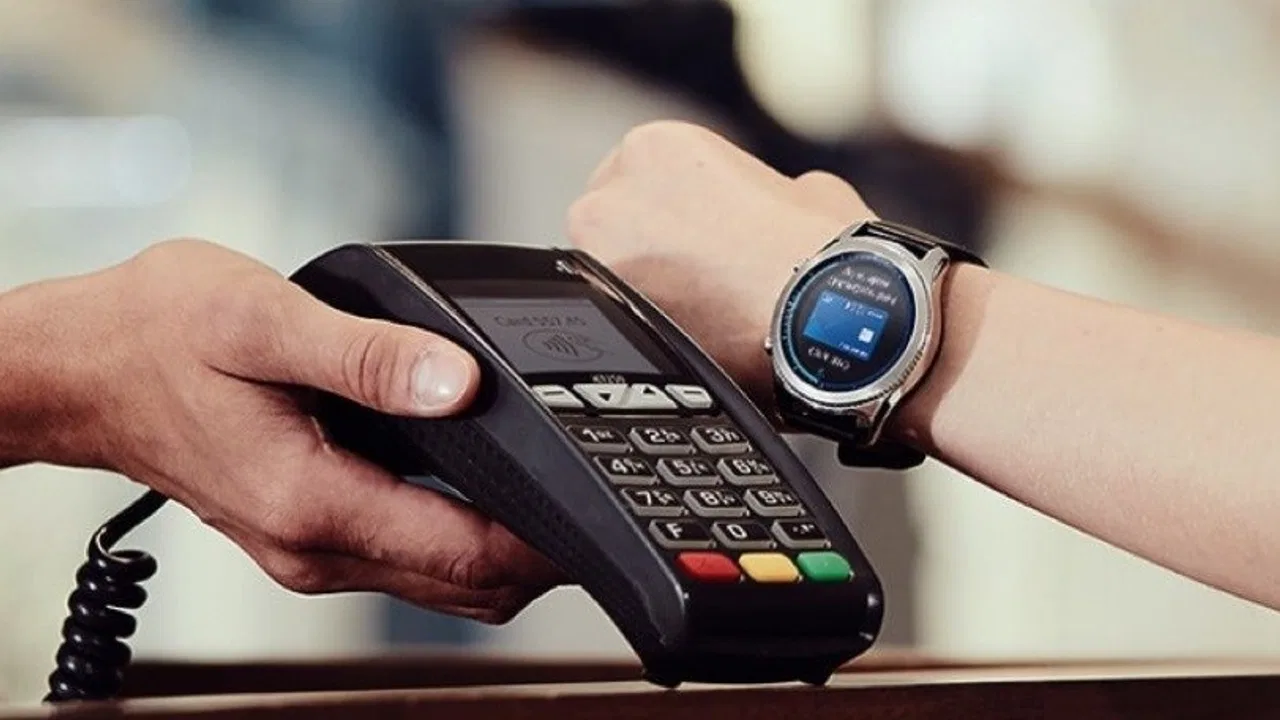
The watch angle deserves special attention. A phone-based wallet is already convenient, but a watch reduces the number of movements involved. I can keep my phone in a pocket, raise my wrist, authenticate when required, and present the watch to the reader. That is particularly practical when I am carrying shopping bags, walking with a child, exercising, or wearing clothing with awkward pockets. The gain is not dramatic on paper; in real use, it removes a small interruption that happens repeatedly.
The strongest reason to choose Samsung Wallet is not the label “wallet”; it is the shorter path between reaching the checkout and completing a payment. If that shorter path fits your routine, the app can feel almost invisible. If your bank or device does not cooperate, the same simplicity disappears quickly.
Setting it up without making payment the first test
I recommend setting up the app at home rather than during a purchase. The first useful step is checking whether the Samsung phone or watch and the intended card are supported in the region. Samsung Wallet is developed by Samsung, but the payment relationship still involves the card issuer and the terminal. A successful installation alone does not guarantee that a particular card can be added or used.
Once the card is available in the wallet, I would make a small test purchase before relying on it for a larger bill. This is a practical habit, not a criticism of the app. It confirms that the card was added correctly, the device is ready, and the local terminal accepts the relevant contactless method. Testing early also prevents the most frustrating version of a payment problem: discovering it when there is no time to switch methods calmly.
On a phone, the workflow is straightforward when the wallet shortcut is ready. I open the payment card, authenticate using the security method configured on the device, and hold the phone near the reader. On a watch, the interaction is more deliberate because I need to prepare the watch before presenting it. That extra preparation is still worthwhile when my phone is buried in a bag, but it means the watch is not automatically faster in every situation.
I also pay attention to the device state before leaving home. A nearly empty battery, a recently changed security setting, or a watch that has not been used for payments in a while can turn a normally quick action into a pause. I do not treat the wallet as a reason to stop carrying a backup option. Digital convenience works best when it complements sensible preparation.
A realistic morning where the watch earns its place
Imagine a weekday morning when I am leaving a gym, carrying a water bottle and a small bag, and stopping for breakfast. My phone is zipped away, my hands are full, and I do not want to handle a physical card. I prepare the watch, authenticate, and present it at the terminal. The payment takes place without unpacking anything. That is the kind of scenario in which Samsung Wallet on a watch feels meaningfully better than reaching for a phone.
The same situation also shows the limitation. If the watch is not supported for the intended payment setup, if the card cannot be added, or if the terminal does not accept the contactless transaction, the convenience ends at the point where it matters. I would therefore use the watch as my fastest option, while keeping the phone or another payment method available as a fallback.
For a phone-only user, the benefit is different. The phone is usually already in hand, so the app mainly reduces the need to carry a separate card. That can be valuable, but it may not feel transformative if I already use another mobile wallet comfortably. The watch is where Samsung’s approach has the clearest everyday distinction, provided the hardware and financial setup line up.
What changes compared with a physical card
A physical card remains the simplest mental model: take it out, tap or insert it, and put it away. Samsung Wallet adds a device step, but it can also reduce the number of objects I carry. The trade is between physical simplicity and digital flexibility. I gain a payment option on a device that is already part of my routine, but I become more dependent on the device being charged, configured, and accepted by the payment system.
Compared with using a bank’s own app, Samsung Wallet is usually more convenient at the terminal because it is designed around presenting a stored payment card rather than navigating through account screens. A bank app may still be better for checking transactions, managing account-specific controls, or resolving a declined payment. I see Samsung Wallet as the front door for the payment action, not a complete replacement for my bank’s tools.
Compared with another platform wallet, the choice is mostly practical rather than ideological. A Samsung user who already owns a compatible watch may gain a smoother wrist-based workflow here. Someone using a different phone ecosystem, or someone whose preferred bank supports another wallet more reliably, may have little reason to change. The best wallet is the one that supports the card I actually use and works at the places I visit.
The small habits that make it more reliable
I would keep one primary card ready instead of treating the app as a place to experiment at the checkout. A focused setup makes the payment screen easier to use and reduces the chance of selecting the wrong card under pressure. If I need a different card, I choose it before presenting the device, not while the terminal is waiting.
For watch payments, I would practice the sequence once without a queue behind me. The important detail is learning where the payment control is and how authentication behaves on that watch. Familiarity matters more than speed. A few seconds spent learning the gesture at home can prevent fumbling at a busy counter.
I also separate payment convenience from transaction management. After paying, I check the bank’s normal account tools when I need a complete record or want to investigate a declined transaction. This avoids expecting Samsung Wallet to answer every financial question. It is a payment interface first, while the bank remains the authority for the account itself.
Another useful habit is to keep the app and device software current through normal updates. I would not update immediately before an important trip or event, but I would avoid leaving the wallet untouched for a long period. The current release is 8.0.10.20806, and using a current version is a sensible way to reduce avoidable compatibility friction without assuming that updates solve every regional or issuer limitation.
Where the experience can become frustrating
The average rating of 3.4 suggests that popularity should not be confused with universal satisfaction. My main reservation is that the app’s success depends on several parts outside the app itself. A user can have a suitable Samsung device and still face a problem with card eligibility, regional availability, or a merchant terminal. When an app is used for payment, that uncertainty feels more serious than a minor inconvenience in a typical lifestyle app.
The watch experience also has a trade-off that is easy to overlook. It is wonderfully hands-free when the watch is already part of my routine, but it adds another device to maintain. I need to remember the watch, keep it charged, and understand its payment flow. If I only wear it occasionally, the phone may actually be the simpler choice because it is more familiar and usually closer at hand.
There is also a psychological limitation. Some people prefer a physical card because it works without thinking about battery level, menus, or device settings. Samsung Wallet does not remove that preference. It is a strong convenience tool for people comfortable with device-based payments, but it is not automatically better for someone who wants the fewest digital dependencies possible.
I would skip it as my main payment method if my everyday cards are not supported, if I regularly shop in places with unreliable contactless terminals, or if I dislike troubleshooting phone and watch settings. I would also avoid making it my only option during travel unless I had already tested the setup in the destination environment. A free app can still cost time when it fails at the wrong moment.
Who gets the most from Samsung Wallet
The best fit is a Samsung phone owner who already uses contactless payments and wants one consistent place to access a supported card. The fit becomes stronger for someone with a compatible Samsung watch, because the wrist-based option solves a real physical problem: paying without taking out a phone or wallet. People who make many small in-person purchases may notice the accumulated convenience more than someone who rarely pays at a terminal.
It is also useful for users who want to reduce the number of physical cards they carry while keeping a familiar payment card behind the scenes. I like that approach because it does not require changing the underlying spending habit. I am still using my chosen card; I am simply presenting it through the device that is already with me.
On the other hand, someone who owns an iPhone, prefers a different mobile wallet, or has a bank that works better elsewhere should not switch just because Samsung Wallet is widely installed. The app’s 50 million-plus installs show broad reach, but reach does not guarantee that it is the right tool for a particular banking setup. Compatibility and routine matter more than the install figure.
The Everyone age rating makes the app broadly approachable, but younger or less experienced users may still need help understanding that a wallet does not replace the underlying bank account or card issuer. I would explain the difference before handing the device over for a purchase: the app helps present the card, while account questions and declined transactions may still require the bank.
My recommendation after using it as a daily payment tool
Samsung Wallet is at its best when I focus on one clear job: making a supported card available quickly from a Samsung phone or watch. The phone version is convenient and familiar, while the watch version can be genuinely liberating in situations where carrying or unlocking a phone is awkward. That is a more meaningful advantage than simply having another place to store payment information.
I would install it for a compatible Samsung setup, add the card I use most, test a small payment, and keep a backup method available. I would not choose it blindly if my bank support or local terminal compatibility is uncertain. The app is free, but the real cost of a poor setup is inconvenience at checkout, so preparation matters.
My final view is positive but conditional. Samsung Wallet does not make every payment experience effortless, and it cannot overcome unsupported cards or unsuitable terminals. When the pieces fit, though, it removes just enough friction to become a habit—especially on a watch. For Samsung users who value quick, device-based payments, I think it is worth trying; for everyone else, the usual wallet already supported by their phone and bank may remain the smarter choice.
FAQs for Samsung Wallet/Pay (Watch)
01What is Samsung Wallet/Pay (Watch) and how does it work?
Samsung Wallet/Pay (Watch) is a mobile payment and digital wallet service designed for Samsung smartwatches. It allows users to make secure payments directly from their wrist using NFC technology. By linking your credit or debit cards, you can make transactions at any contactless payment terminal without needing your phone or wallet.
02Is Samsung Wallet/Pay (Watch) secure to use?
Yes, Samsung Wallet/Pay (Watch) uses multiple layers of security to protect your payment information. It employs tokenization, which replaces your card details with a unique code, and requires authentication through your smartwatch’s PIN code. This ensures that your financial data is not exposed during transactions.
03Can I use Samsung Wallet/Pay (Watch) internationally?
Samsung Wallet/Pay (Watch) can be used internationally wherever contactless payments are accepted. However, it's important to check with your bank or card issuer about any international transaction fees that may apply. Additionally, ensure your smartwatch is compatible with payment terminals in the country you are visiting.
04What do I need to set up Samsung Wallet/Pay (Watch)?
To set up Samsung Wallet/Pay (Watch), you need a compatible Samsung smartwatch and the Samsung Wallet app installed on your smartphone. You must also have a Samsung account and a supported credit or debit card. Once these are in place, you can add your cards to the app and start making payments.
05What should I do if my Samsung smartwatch is lost or stolen?
If your Samsung smartwatch is lost or stolen, it's crucial to act quickly to protect your payment information. You can remotely lock or wipe your device using the Find My Mobile service. Additionally, contact your bank or card issuer to suspend your cards in Samsung Wallet to prevent unauthorized transactions.
Pros
- Offers seamless integration with Samsung devices.
- Supports a wide range of payment methods.
- Quick setup with intuitive user interface.
- Enhances security with biometric authentication.
- Useful for managing loyalty cards and coupons.
Cons
- Limited compatibility with non-Samsung devices.
- Occasional connectivity issues with some networks.
- Fewer supported banks compared to competitors.
- Requires frequent updates for optimal performance.
- Not available in all countries globally.

Samsung Wallet/Pay (Watch)
Gallery